You run a scan through OCR, and the result is almost perfect – almost. A few numbers are off. A name comes out misspelled. A table has shifted a column. If the software is “99% accurate”, why is it making these mistakes at all? The answer starts with what OCR accuracy actually means, and it is less reassuring than it sounds: 99% accuracy is not “nearly flawless” – on a normal page it means roughly fifteen to twenty errors. This guide explains why OCR makes mistakes, why the errors it makes are the dangerous kind, and how to push real-world OCR accuracy up toward the level you can actually trust.
OCR Accuracy: What “99% Accurate” Really Means
Accuracy figures sound comforting until you do the arithmetic. A typical page holds around 1,500 to 2,000 characters. At 99% character-level OCR accuracy, one character in a hundred is wrong – so a single page carries roughly fifteen to twenty errors. At 99.9%, still one or two per page. “Nearly perfect” on paper is a scattering of mistakes in practice, and on a hundred-page document that adds up to well over a thousand errors. The number is not wrong; our intuition about it is. (If the mechanics are new to you, our guide to how OCR recognition works covers the pipeline that produces these results.) Once you see accuracy as errors-per-page rather than a reassuring percentage, the real question changes from “is it accurate?” to “where are the errors, and do they matter?”
Why OCR Errors Are the Dangerous Kind
Here is what makes OCR mistakes worse than ordinary typos: they usually pass every automatic check. A spellchecker flags “teh”, but it will not flag a “1” that OCR read as a “7”, because both are valid. It will not catch “modem” where the page said “modern”, because both are real words, and it will not question a date, an invoice total, or a reference number that came out wrong but plausible. The errors OCR makes are real words and valid-looking numbers – exactly the kind nothing downstream catches. That is why unverified OCR output is risky precisely where it matters most: financial figures, legal clauses, medical values, identifiers. The mistake is invisible until someone relies on it – the same reason a wrong text layer makes a searchable PDF quietly miss words.
The Four Reasons OCR Gets It Wrong
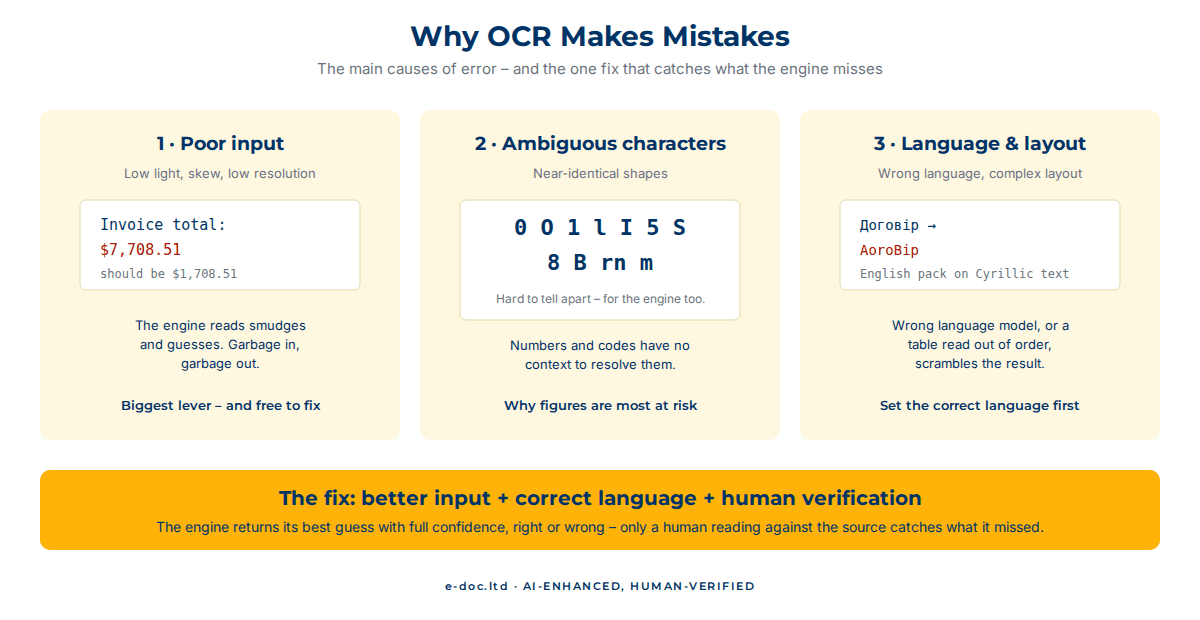
OCR errors are not random. They come from four recurring causes, and knowing them tells you where accuracy is won or lost:
1. Input quality (the biggest lever)
Low resolution, uneven lighting, shadows, skew, folds, bleed-through, and compression artifacts all degrade the image the engine has to read. A crisp 300-dpi scan gives an engine clean shapes to recognize; a dim, angled phone photo gives it smudges to guess at. Open-source engine documentation makes the same point: its guide to better output starts with image resolution, skew, and noise. Most poor OCR accuracy traces straight back to a poor input image, which is also the easiest thing to fix.
2. Ambiguous characters
Some characters are near-twins: 0 and O, 1 and l and I, 5 and S, 8 and B, rn and m. On a clean, high-resolution image the engine resolves them from shape and context; on a degraded one, it guesses. This is why numbers and codes – which have no surrounding words to provide context – are the most error-prone content of all.
3. Language and script
OCR leans on language models to resolve ambiguity, so the wrong language setting wrecks accuracy. An engine set to English reading Ukrainian or Arabic has no correct dictionary to check against and produces confident nonsense. Non-Latin scripts (Cyrillic, CJK, Arabic) and mixed-script documents are where language configuration matters most. Our guide to multilingual OCR covers what to set up, script by script.
4. Layout complexity
Multi-column pages, tables, footnotes, sidebars, and text wrapped around images all challenge the layout-analysis stage. The engine may read every character correctly, but if it misjudges the reading order or table structure, the output comes out scrambled even though every letter is right.
Why Even Great Engines Hit a Ceiling
Modern AI-based recognition is genuinely impressive, and on clean, printed, single-language, simply-laid-out documents it reaches very high accuracy. But every engine hits a ceiling, because the causes above compound. A document is rarely perfect on all four axes at once: a real archive has faded pages, mixed languages, the odd table, and numbers with no context. Each factor multiplies the others, and the engine has no way to know when it is wrong – it returns its best guess with the same confidence whether it is right or not. That last point is the crux: the software cannot flag its own mistakes. Improving OCR accuracy past the engine’s ceiling is not about a better engine. It is about catching what the engine cannot.
Need OCR you can actually trust on the numbers?
We pair recognition engines with human verification against the source – so we catch the errors that pass every automatic check before they reach you, across 50+ languages.
How to Improve OCR Accuracy in Practice
You can push OCR accuracy up a long way before you involve a professional – and then there is a last mile that only verification closes:
- Start with the best input. This is the single biggest lever and it is free. A straight 300-dpi scan beats a phone photo; even lighting and a flat page beat shadows and skew. Fixing the image often fixes the accuracy.
- Set the correct language. Configure the exact language – or languages – of the document before recognition. On non-Latin or mixed-script content this alone can be the difference between usable and useless.
- Keep layouts simple where you can. If you control the source, keep it clean – engines read simple layouts more reliably. Where you do not, expect tables and columns to need manual repair.
- Verify what matters against the source. For anything with consequences – figures, names, legal or medical content – someone has to read the output against the original. This is the only step that catches the plausible-but-wrong errors, and it is the heart of the “AI-Enhanced, Human-Verified” approach.
The first three get you most of the way. The fourth is what turns “roughly right” into “reliable”, and it is the reason our OCR always ends with a human reading the output against the source, not just trusting the engine’s confidence.
When DIY Stops Making Sense
For a clean page in a major language where a stray error costs nothing, run it yourself and glance over the result. The thresholds that change the picture:
- Numbers and identifiers. Anywhere a transposed digit matters – finance, invoices, references – unverified OCR is a liability.
- Volume. You can eyeball one page. You cannot reliably eyeball a thousand, which is exactly when errors slip through unnoticed.
- Non-Latin or mixed scripts. If you cannot read the language, you cannot catch the errors – they are invisible to you and obvious to your reader.
- Consequences. Legal, medical, or compliance content, where a single wrong value has real cost.
Below those thresholds, DIY plus a careful read is fine. Above them, the safe move is a pipeline where a human verifies the output – because the engine, however good, cannot tell you which of its answers to doubt.
Frequently Asked Questions
What is a good OCR accuracy rate?
On clean printed text, modern engines reach 98–99.5% character accuracy or better. But even 99% means roughly fifteen to twenty errors per page, so “good” depends on your tolerance: for casual reading it is fine, while for figures, names, or legal content it still needs human verification.
Why does OCR make mistakes on numbers more than words?
Words have surrounding context and a dictionary the engine can check against; numbers do not. A misread digit is still a valid number, so nothing flags it. That is why identifiers, totals, and reference codes are the most error-prone and the most important to verify.
How can I improve OCR accuracy myself?
Start with the best possible image – a straight 300-dpi scan in even light beats a phone photo – and set the correct language before recognition. Those two steps fix most accuracy problems. For content that matters, the final step is reading the output against the source.
Does better OCR software give better accuracy?
Up to a point. A strong engine helps, but every engine hits a ceiling set by input quality, ambiguous characters, language, and layout. Past that ceiling, accuracy comes from better input and human verification, not from a different piece of software.
Can OCR ever be 100% accurate?
Not reliably, on its own. Even the best engines misread degraded input, ambiguous characters, and complex layouts, and they cannot flag their own mistakes. The only way to reach effectively 100% on content that matters is to verify the output against the source by hand.
Why is OCR accuracy worse on non-English documents?
Because recognition depends on the correct language model. An engine set to the wrong language, or reading a non-Latin script without the matching language set, has no correct dictionary to resolve ambiguity and produces confident errors. Setting the exact language is essential for non-English accuracy.
So, OCR makes mistakes because it is reading images, not text – and image quality, ambiguous characters, language, and layout each pull accuracy down. The uncomfortable part is that “99% accurate” still means errors on every page, and they are the plausible, spellcheck-proof kind that hide until someone relies on them. Getting OCR accuracy to a level you can trust is part better input, part correct settings, and – for anything that matters – part human verification. The engine reads fast; the human catches what it cannot see. That is exactly where machine speed plus human checking earns its keep.