Someone told you to “just run OCR on it” – and you nodded while quietly wondering what that actually involves. So, what is OCR? Optical character recognition is the technology that turns pictures of text – scanned pages, photographed documents, image-only PDFs – into real, editable, searchable text a computer can work with. It sits behind searchable archives, digitized libraries, translation workflows, and every “convert scanned PDF” button you have ever clicked. This guide answers the question “what is OCR” in plain language, walks through how the recognition pipeline actually works, sorts out the alphabet soup around it (ICR, OMR, IDP), and shows honestly where the technology shines, where it fails, and why the last step for documents that matter is still a human being.
What Is OCR? The Plain-Language Definition
To a computer, a scanned page is not text – it is a grid of colored dots, no different from a photo of a cat. You can look at the scan and read it; software cannot, because nothing in the file says “this shape is the letter A”. OCR closes that gap: it analyzes the picture, finds the shapes that look like characters, decides which character each shape represents, and outputs actual text – the kind you can edit in Word, search with Ctrl+F, copy, translate, or feed into a database.
The practical difference is enormous. An image-only PDF of a 300-page report is a dead archive: you cannot search it, quote it, or update it without retyping. The same document after OCR becomes a living file – every word findable, every paragraph editable. That single transformation is why OCR underpins so much of modern document work, from law firm archives to translation agencies preparing source files.
How OCR Actually Works – From Pixels to Paragraphs
Modern recognition engines run a pipeline of five stages, and understanding them explains almost every OCR success and failure you will ever see:
- Image preparation. The engine cleans the scan before reading it: straightening skewed pages, removing speckles and shadows, sharpening contrast, separating text from background. Garbage in, garbage out applies with full force – a crisp 300-dpi scan and a tilted phone photo of the same page produce very different results downstream.
- Layout analysis. Before reading a single letter, the software maps the page: here are text columns, here is a table, here is an image, here is a caption. This stage decides whether a two-column article comes out as two clean columns or as interleaved word salad – and it is where complex layouts win or lose.
- Character recognition. The core act: each character image gets classified. Modern engines use machine-learning models trained on millions of samples rather than rigid shape templates, which is why they cope with varied fonts, sizes, and mild distortion.
- Language modeling. Raw character guesses get checked against dictionaries and language statistics. The engine knows “recognltion” is unlikely and “recognition” is likely, so ambiguous shapes resolve toward real words. This is also why telling the engine the correct language matters so much – a Ukrainian document processed with English-only settings loses this entire safety net.
- Reconstruction and export. Finally, recognized text gets reassembled into a document: paragraphs, styles, tables, reading order, and output to Word, searchable PDF, or structured data.
Every stage is probabilistic – the engine is always making its best statistical guess, never “reading” with certainty. That is the honest answer to “what is OCR” at a technical level: a chain of educated guesses, remarkably good ones, whose combined accuracy depends on how much each stage had to fight the input.
The Recognition Family Tree
OCR travels with a cluster of sibling acronyms that vendors love and newcomers mix up. The diagram sorts the family:
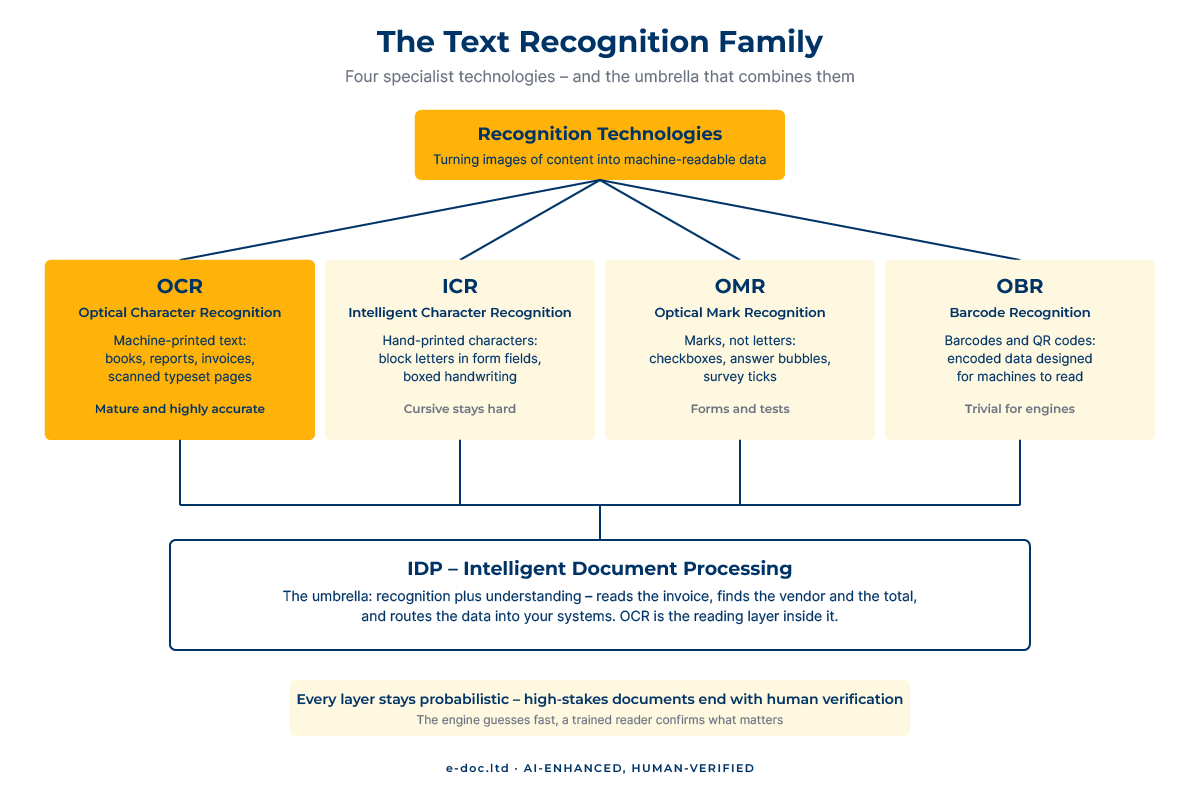
- OCR – Optical Character Recognition. Machine-printed text: books, reports, invoices, anything typeset. The mature core of the family and the subject of this guide.
- ICR – Intelligent Character Recognition. Hand-printed characters – block letters in form fields. Workable when writing is neat and boxed; cursive handwriting remains genuinely hard even for modern AI models. Our guide to converting handwriting to text shows what is realistic for each kind of handwriting.
- OMR – Optical Mark Recognition. Not letters at all, but marks: checkboxes, filled bubbles on answer sheets, survey ticks.
- OBR – Barcode Recognition. Barcodes and QR codes – trivial for machines, included in most professional engines.
- IDP – Intelligent Document Processing. The umbrella term: recognition plus understanding. An IDP system does not just read an invoice – it identifies the vendor, extracts the total, and routes the data into your accounting system. OCR is the reading layer inside it.
If you want vendor-level detail, this technical overview of how modern AI-based OCR differs from the traditional kind goes deeper into the machine-learning side.
What OCR Handles Well – and What Breaks It
Modern engines routinely achieve high accuracy on favorable inputs – and “favorable” is the key word. The factors that decide your result, roughly in order of impact:
- Scan quality. Resolution around 300 dpi, even lighting, flat pages. Skew, shadows, bleed-through from the reverse side, and compression artifacts all tax stage one of the pipeline before recognition even starts.
- Print quality of the original. A laser-printed report and a fifth-generation fax photocopy are different planets. Faded typewriter carbon copies, dot-matrix output, and degraded historical documents push engines toward guessing.
- Layout complexity. Single-column text is easy. Multi-column newsletters, nested tables, marginal notes, and text wrapped around images stress layout analysis – errors here scramble reading order even when every character is recognized correctly.
- Language and script. Major Latin-script languages enjoy the deepest training data and dictionary support. Cyrillic is well supported by professional engines and poorly supported by casual tools; CJK, Arabic, and mixed-script documents (a Ukrainian contract quoting English clauses, say) demand deliberately chosen engines and settings – our multilingual OCR guide explains what changes for each script.
- Special content. Formulas, chemical notation, sheet music, stamps overlapping text – specialist territory where general-purpose OCR degrades sharply.
The practical takeaway: when OCR “fails”, the cause usually sits in the input or the settings, not in some fundamental limit of the technology. The same page rescanned properly, with the right language pack selected, often jumps from unusable to nearly perfect – our guide to converting scanned PDFs to Word walks through exactly that process step by step.
Where OCR Fits in Real Workflows
Four patterns cover most of what organizations actually do with recognition:
- Searchable archives. The scan stays visually identical, but an invisible text layer sits underneath – Ctrl+F suddenly works across decades of paper. The standard move for legal files, corporate records, and library collections.
- Editable conversion. Scan in, Word file out – for documents that need updating, reformatting, or reuse. This is OCR feeding the broader world of PDF-to-Word conversion.
- Translation preparation. Translators and agencies cannot work from images; CAT tools need real text. OCR turns client scans into translatable source files – with layout preserved well enough to rebuild the target document afterward.
- Data extraction. Reading specific values – invoice totals, form fields, table contents – out of document streams and into systems. The doorway into IDP territory.
AI-Enhanced, Human-Verified – Why Accuracy Still Needs People
Here is the honest arithmetic the marketing pages skip. An engine hitting 99% character accuracy on a decent scan sounds finished – until you notice that a typical page holds around two thousand characters, so 99% means roughly twenty errors per page. Across a 100-page document, that is two thousand silent mistakes: swapped digits in figures, dropped diacritics, plausible-looking wrong words that no spellchecker flags because they are real words. For a blog post, tolerable. For a contract, a financial statement, or a regulatory submission – not.
That is why professional OCR work is a two-part discipline: machine recognition to do 99% of the labor in seconds, and trained human eyes to catch the errors that remain – reading against the source, verifying numbers, checking that the Cyrillic “Н” did not become a Latin “H” somewhere it matters. We built our entire OCR practice on that principle, and it is precisely what “AI-Enhanced, Human-Verified” means on every page of this site: the engine’s speed, plus accountability no engine provides.
Need scanned documents turned into accurate, editable text?
We combine professional recognition engines with page-by-page human verification across 50+ languages – delivering searchable PDFs and clean Word files you can rely on.
When DIY Stops Making Sense
Built-in OCR in Acrobat or a decent scanner app genuinely covers the everyday case: a few clean pages, a major language, stakes low enough that a stray error costs nothing. The thresholds that change the picture:
- Volume. Recognition scales effortlessly; verification does not. Five hundred pages of archive means five hundred pages someone must check – or accept unchecked.
- Degraded sources. Old photocopies, faxes, historical documents. Error rates climb, and cleanup starts consuming multiples of the recognition time.
- Multilingual and non-Latin content. If you cannot proofread the script yourself, every OCR error is invisible to you and glaring to your reader.
- Stakes. Legal, financial, medical, regulatory – anywhere a transposed digit has consequences, unverified OCR output is a liability, not a deliverable.
- Layout that must survive. When the output needs to look like the source – tables intact, structure preserved – reconstruction work dwarfs recognition work.
Below those thresholds, run the built-in tool and move on. Above them, the mathematics of your time – and the cost of a missed error – favor a professional pipeline.
Frequently Asked Questions
What does OCR stand for?
Optical character recognition – the technology that converts images of text (scans, photos, image-only PDFs) into machine-readable, editable, searchable text.
Is OCR 100% accurate?
No, and no honest vendor claims it is. Modern engines reach very high accuracy on clean input – but even 99% accuracy means roughly twenty character errors on a typical page. Input quality, language settings, and layout complexity drive the real number, and documents where errors carry consequences need human verification after recognition.
What is the difference between OCR and ICR?
OCR reads machine-printed text – anything typeset or printed. ICR (intelligent character recognition) reads hand-printed characters, like block letters in form boxes. Cursive handwriting sits beyond both and remains difficult even for current AI models.
Does OCR work on photos taken with a phone?
Yes, with caveats. Recognition engines handle photographed documents, but perspective distortion, uneven lighting, and shadows all cut accuracy. Shooting straight-on, in even light, with the page flat gets a phone photo surprisingly close to scanner quality – and a proper 300-dpi scan still wins for anything important.
Can OCR recognize languages other than English?
Professional engines support well over a hundred languages, including full Cyrillic, CJK, and Arabic coverage – but only if the correct language is configured before recognition. Language settings drive the dictionary-checking stage of the pipeline, and mismatched settings are among the most common causes of poor results on non-English documents.
What is a searchable PDF?
A PDF where the original page image stays visible while an invisible OCR text layer sits underneath. The document looks exactly like the scan but supports full-text search, copying, and indexing – the standard format for digitized archives.
Does OCR preserve the formatting of my document?
Partially. Layout analysis reconstructs columns, paragraphs, and many tables, and good engines rebuild structure impressively on clean documents. Complex layouts – nested tables, text wrap, dense multi-column design – lose structure that only manual reconstruction fully restores.
Is OCR the same as converting PDF to Word?
They overlap but differ. A born-digital PDF already contains text, so converting it to Word needs no recognition at all. A scanned PDF contains only images, so OCR is the mandatory first step before any Word conversion can happen. Whether your file needs OCR is the first question of every conversion project.
So, what is OCR at the end of the day? A probabilistic reading machine – astonishingly capable, honestly imperfect, and transformative when you understand both halves of that sentence. Feed it good input, configure the language, respect its limits, and it turns mountains of paper into working digital text. And when the mountain is large, degraded, multilingual, or simply too important for silent errors – that is exactly where machine speed plus human verification earns its keep.