A scanned Ukrainian contract comes back from OCR looking perfect. The paragraphs are in place, the letters look right – and then a search for the client’s name finds nothing. The software replaced some of the Cyrillic letters with Latin look-alikes that appear identical on screen but are different characters underneath. That is a quiet failure behind many problems with multilingual OCR: the output looks fine until someone searches it, spell-checks it, or loads it into a translation tool. This guide explains what changes when a document is not in English, script by script, and what to set up and check so the text you get is the text on the page.
What Multilingual OCR Actually Means
Multilingual OCR is not a single feature you switch on. Recognition engines read shapes, then lean on language knowledge – character sets, dictionaries, word patterns – to decide between similar candidates. When the engine knows which languages are on the page, it resolves ambiguous shapes correctly. When it guesses, or assumes English, it produces confident nonsense. Our overview of how OCR turns a page image into text covers the basic mechanics; here the point is what language support really involves.
Two terms help. A language is what the words mean: Ukrainian, Russian, Arabic, Japanese. A script is the writing system: Latin, Cyrillic, Arabic, Han characters. Ukrainian and Russian share the Cyrillic script but not the same alphabet; Persian uses the Arabic script but adds letters of its own. Good results depend on both settings:
- Select every language on the page – and only those. Many engines accept several languages at once. Each extra language gives the engine more wrong options to choose from, so a long “just in case” list lowers accuracy.
- Do not rely on automatic detection for mixed pages. Auto-detect works reasonably on a page in one language. On a contract that switches between Ukrainian and English, some engines settle on one language and read the other through it.
- Check that the engine has data for your language at all. Free tools can cover major European languages well and others only partly, even when the language appears in a feature list.
Script by Script – What Changes for OCR
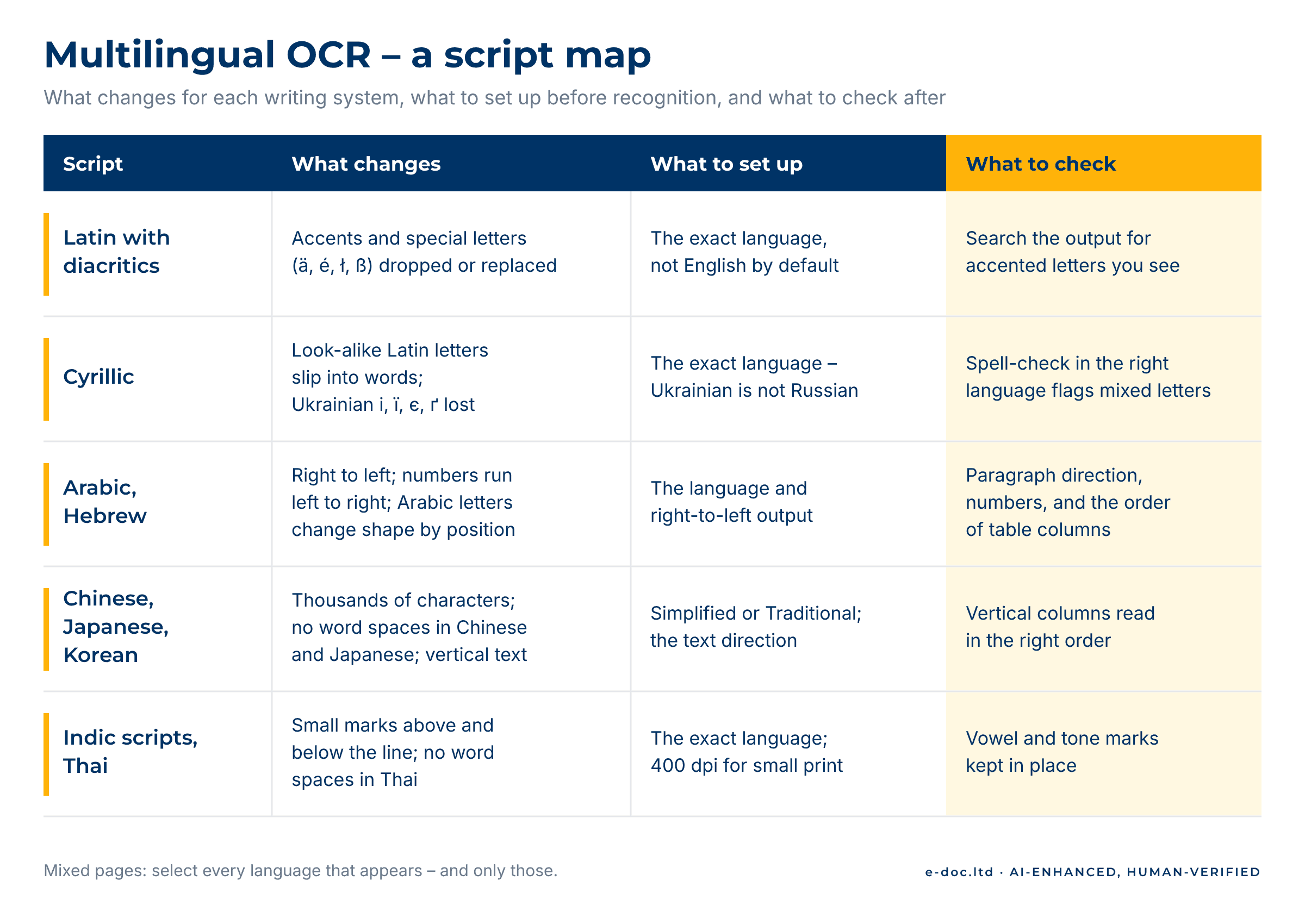
Each writing system breaks recognition in its own way. Knowing the typical failure for your script tells you where to look first.
Latin with diacritics
German, French, Polish, Czech and other languages use accents and special letters – ä, é, ł, ř, ß. An engine set to English often drops or replaces these letters, so “Łódź” can come back as “Lodz” and spelling breaks across the document. The fix is simple: set the correct language. The check is simple too: search the output for a few accented letters you can see in the scan.
Cyrillic
Cyrillic OCR has a failure that is easy to miss because it is invisible. Several Cyrillic letters look exactly like Latin ones – а, е, о, р, с, у, х, і – yet they are different characters with different codes. A recognition engine that is unsure which script it is reading can mix them inside a single word. On screen nothing looks wrong; in practice, search, sorting, spell-check and translation-memory matches fail. The Unicode Consortium describes these mixed-script look-alike characters in its security standard, because attackers use the same trick in fake web addresses.
A second trap is the language itself. Ukrainian has letters that Russian does not – і, ї, є, ґ. An engine set to Russian reads a Ukrainian page as Russian and turns these letters into their nearest Russian neighbours. Always set the exact language, not just “Cyrillic”.
Arabic and Hebrew
Both scripts run right to left, and that alone causes many errors: when the recognized text lands in a document with the wrong paragraph direction, words and numbers can come out in the wrong order and punctuation jumps to the wrong end of the line. Numbers add a twist – they run left to right even inside Arabic or Hebrew text, so a line contains two directions at once. Tables mirror as well: the first column sits on the right.
Arabic OCR adds joining. Letters connect, and each letter takes one, two or four different forms depending on its position in the word, as the W3C Arabic and Persian layout requirements explain. Small dots distinguish letters that otherwise share a shape, so a low-resolution scan or a speck of dust changes the letter. When the recognized text later goes into layout, the same direction rules apply – the topic of our guide to right-to-left layout in Arabic DTP.
Chinese, Japanese and Korean
Where Latin and Cyrillic alphabets have a few dozen letters, Chinese and Japanese use thousands of characters, and some differ by a single stroke. Chinese and Japanese also write without spaces between words, so the engine cannot use word boundaries to check itself. Korean uses spaces, but its syllable blocks combine several letters into one shape.
Three settings matter here. Simplified and Traditional Chinese are separate options, and the wrong one degrades results badly. Japanese pages mix three scripts – kanji, hiragana and katakana – often with Latin words and numbers on the same line. And some Japanese and Chinese documents, especially older or formal ones, use vertical text, read top to bottom with columns running right to left; an engine that expects horizontal lines reads vertical columns as scrambled fragments.
Indic scripts and Thai
Devanagari (used for Hindi) and some related scripts, such as Bengali and Gurmukhi, join letters along a top line and combine consonants into conjunct shapes, with vowel signs above, below and beside the letter. Thai writes words without spaces and places vowel marks above, below and beside the consonants, and tone marks above them. In both cases the marks that change meaning are small, so scan resolution matters more than usual – for small print, scanning at 400 dpi rather than 300 gives the engine more to work with.
Scans in languages your tools keep getting wrong?
We set up recognition for the languages on your pages and deliver editable files that keep the original tables and structure as closely as the scan allows. For Latin and Cyrillic scripts, we check the result against the source. For Arabic, Hebrew and Asian scripts, we process the files with quality that depends on document clarity and script complexity, and your editors or translators do the final language review.
Mixed-Language Documents
A common trouble spot is not an exotic script but two languages on one page: a Ukrainian contract that quotes English clauses, a bilingual certificate, an Arabic invoice full of Latin product codes, a Japanese manual with English part names. Here multilingual OCR succeeds or fails on preparation:
- Select both languages before recognition. With only one selected, the engine reads the other language through the wrong alphabet – one way Latin and Cyrillic look-alikes end up mixed inside words.
- Handle clearly separated blocks separately. If one column is English and the other is Arabic, recognizing each column with its own settings beats one pass over the whole page.
- Watch the transitions. Errors cluster where one language ends and the other begins – the first word after a switch, quoted terms, names in a foreign script.
- Treat codes and numbers as their own language. Part numbers, article references and dates follow no dictionary, so the engine has nothing to check them against.
If the text is heading for translation, clean recognition matters twice. Translation tools split text into segments and match them against earlier translations; a segment with a hidden Latin letter drops from an exact match to, at best, a fuzzy one, and the translator pays for the error in time.
How to Check the Output When You Cannot Read the Language
The uncomfortable rule is that you cannot fully check text you cannot read – the same point we make in why OCR makes mistakes in the first place. But a lot can be checked without reading a word:
- Structure. Compare paragraph, line and table counts with the scan. Missing rows and merged columns show up without any language knowledge.
- Numbers, dates and codes. They look the same in every language, so you can compare them with the original directly.
- Direction. In right-to-left text, check that each paragraph runs right to left and that table columns follow the original order.
- Spell-check in the right language. The spell-checker flags words with look-alike letters from the wrong script, even when they look correct.
- A quick plausibility test. Run a few recognized lines through a machine translation tool your confidentiality rules allow. If the translation is nonsense while the scan is clear, recognition failed.
These checks catch structural failures. They do not prove the text is right. For documents that matter, the final review belongs to someone who reads the language – an editor, a translator or a colleague – and that review is far faster when the structure is already correct.
When DIY Stops Making Sense
Free and desktop tools handle a clean single-language page well. The effort grows quickly when:
- Most pages mix languages or scripts. Every transition needs checking, and errors multiply with the page count.
- The volume runs to dozens or hundreds of pages. Setting up, splitting and checking by hand stops being a side task.
- Tables or forms run right to left. Mirrored structure is easy to break and slow to repair.
- The text goes into translation. Hidden character errors cost translation-memory matches on every affected segment.
- A wrong letter has consequences. Names in contracts, certificates and official records must match the original exactly.
Past that point, our OCR service takes the setup and the checking off your desk. After translation, the same documents often need layout in the target language – text that runs longer or shorter, or switches direction. That is where multilingual layout after translation picks up where OCR ends.
Frequently Asked Questions
What is multilingual OCR?
Multilingual OCR is text recognition for documents in more than one language or writing system. In practice it means telling the engine which languages and scripts appear on the page, so it can choose between similar-looking characters correctly instead of forcing everything into English.
Can OCR recognize two languages on the same page?
Yes, if you select both languages before recognition. Many engines accept several languages at once. With only one selected, the engine reads the other language through the wrong alphabet, and errors cluster wherever the text switches languages.
Why does OCR mix Latin letters into Cyrillic text?
Several Cyrillic letters – а, е, о, р, с and others – look identical to Latin ones but are different characters. An engine that is unsure of the script can pick the Latin version. The text looks right on screen, but search misses the words, and spell-check and translation tools treat them as unknown.
Does OCR work for Arabic and Hebrew?
Yes, with the right language settings, but expect more checking than for Latin text. Right-to-left direction, numbers that run left to right, mirrored tables and, in Arabic, letters that change shape by position all create errors that a clean-looking result can hide.
Can OCR read vertical Chinese or Japanese text?
Some engines can, when you set the language and text direction correctly. Tools that expect horizontal lines read vertical columns as fragments. Also choose between Simplified and Traditional Chinese explicitly – they are separate settings.
Do I have to tell the OCR software which language the document is in?
You should. Automatic detection works reasonably on a page in one language, but it can struggle with mixed pages and closely related languages such as Ukrainian and Russian. Setting the exact language is a quick, free step that often improves accuracy.
Can you process documents in languages you do not read?
Yes. Recognition, structure and layout do not require reading the language, and many checks work without it. For Latin and Cyrillic scripts we also check the text itself against the source. For Arabic, Hebrew and Asian scripts, the final language review stays with your editors or translators.
Multilingual OCR is less about the engine and more about the setup: the right languages selected, the script’s typical failure in mind, and a check that matches what you can and cannot read. Get those three right, and Cyrillic stays Cyrillic, Arabic keeps its direction, and far fewer hidden errors reach your translators.