Put the same sentence into ten languages and you get ten different lengths – sometimes dramatically different. Text expansion in translation is the most predictable surprise in multilingual document work: everyone has heard that “German runs longer”, yet teams keep designing layouts as if every language will politely occupy the same box as English. This article covers the real expansion numbers by language, why the phenomenon happens, where it hurts layouts most, and how both designers and DTP specialists plan for it – before and after it breaks something.
Text Expansion in Translation by the Numbers
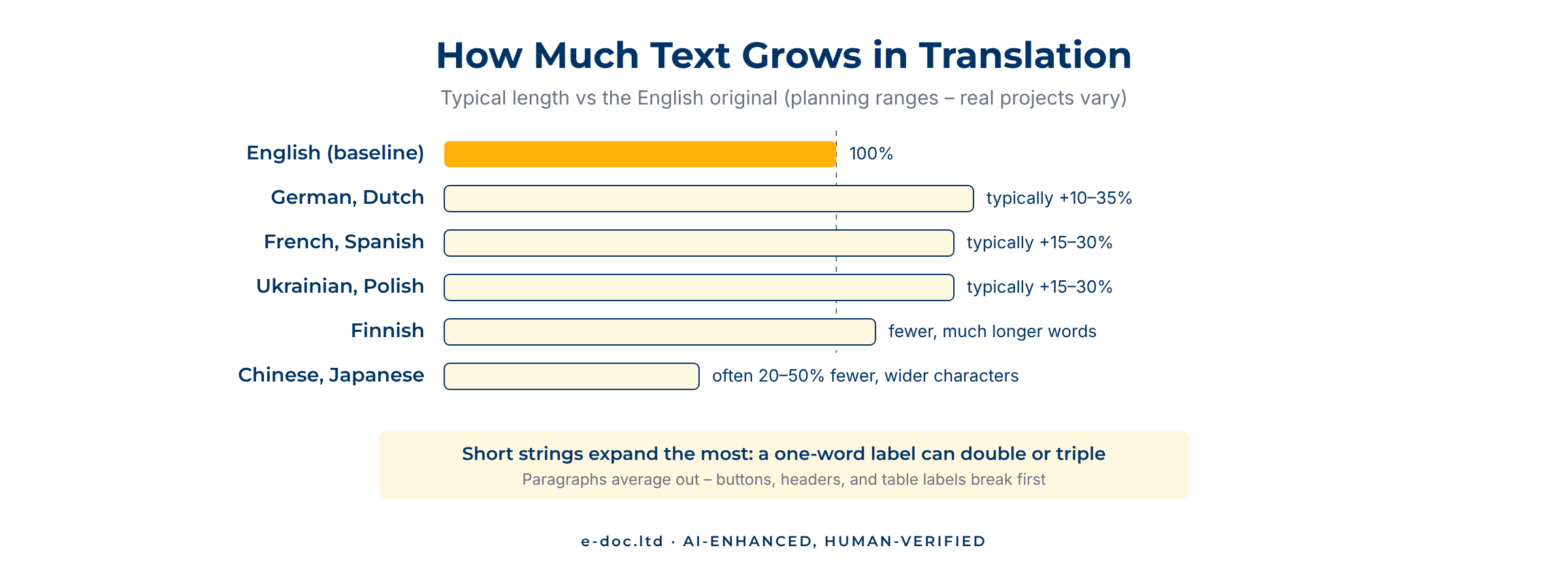
Text expansion in translation is the change in physical length when content moves between languages. Translating out of English, most European languages need more room; some Asian languages need less. The ranges below are typical working assumptions – actual results vary with subject matter and style, which is exactly why they are planning figures, not guarantees:
- German, Dutch: commonly 10–35% longer than English – long compound words that also resist line-breaking.
- French, Spanish, Italian, Portuguese: commonly 15–30% longer – more grammatical words per idea.
- Russian, Ukrainian, Polish: commonly 15–30% longer, with long individual words that strain narrow columns.
- Finnish, Hungarian: fewer, but much longer words – total length varies, line-breaking suffers either way.
- Chinese, Japanese, Korean: often 20–50% fewer characters in body text – but each character is wider and often needs more line height, so the real space saving is smaller than the count suggests. Where text does contract, the problem flips to sparse, gappy layouts.
The least intuitive rule matters most: short strings expand far more than paragraphs. The W3C’s guidance on text size in translation documents this with IBM’s average expansion rates for European languages: English strings of up to 10 characters typically end up two to three times as long, while text over 70 characters averages around 1.3 times the original. The smaller the box, the bigger the percentage surprise.
Why It Happens
Four mechanisms drive most of the effect. Languages differ in how much they pack into a single word – German fuses ideas into compounds while English separates them. They differ in grammatical overhead – Romance languages spend more words on articles, prepositions, and agreement. They differ in abbreviation culture – English tolerates clipped forms (“info”, “FAQ”, “e.g.”) that many languages spell out. And scripts differ in density – one Chinese or Japanese character carries what several Latin letters do, so CJK text needs fewer characters. Each character is wider, though, and often needs more line height, so the space saved is smaller than the count suggests. None of this is the translator being verbose; it is the languages being themselves.
Where It Hurts Layouts Most
Expansion damage is not evenly distributed across a document:
- Buttons, labels, and navigation – the short-string effect at full strength; the places most likely to truncate or wrap ugly.
- Tables – columns sized to English headers collapse when German arrives; numbers stay put while their labels overflow.
- Callouts, sidebars, and infographics – fixed-size design elements with no room to grow.
- Tables of contents and headers/footers – single-line elements that must stay single-line.
- Text inside images – the worst case: expansion meets a graphic that has to be rebuilt, not re-flowed.
- Body text – ironically the most forgiving zone, because paragraphs can reflow; the cost appears as page-count drift between language editions.
How Designers Prevent the Pain
Documents designed with expansion in mind cost visibly less to localize. The working rules:
- Budget the space. Leave roughly a third of breathing room in the text containers of an English master layout – more for short labels.
- Let text flow. Avoid manual line breaks and hand-tuned frame sizes; they all become landmines in other languages.
- Use styles, not local overrides. Paragraph and character styles let a DTP specialist adjust an entire language edition consistently instead of hunting exceptions.
- Keep text out of images. Live text over a graphic re-flows; text baked into the graphic means rebuilding the artwork per language.
- Design tables to breathe. Generous column logic and wrap-tolerant headers survive translation; pixel-perfect English tables do not.
Have layouts that translation has already outgrown?
We re-fit translated documents across 50+ languages – expansion, contraction, tables, and text-in-graphics handled – and return print-ready files that match the original design.
How DTP Fixes It After the Fact
Most projects reach DTP after the design is finished, so the job is to absorb expansion, not prevent it. The re-fitting toolbox, roughly in order of preference: reflow the text and let paragraphs find their length; adjust spacing, leading, and hyphenation within the limits the language allows; resize and re-thread frames where the design tolerates it; rework tables and callouts structurally; and rebuild text-bearing graphics. We keep one tool as a deliberate last resort and use it only within readable limits: shrinking the type. Two sizes down from the original, a language edition no longer matches the design – it just reads worse, and readers notice. This re-fitting pass is a core stage of the post-translation DTP workflow, and it is where the ranges above turn from statistics into concrete page-by-page decisions. For the wider context of that discipline, our pillar on what multilingual DTP is maps the whole territory.
Frequently Asked Questions
What is text expansion in translation?
Text expansion is the change in physical length when you translate content – most European languages run 10–35% longer than English, while Chinese, Japanese, and Korean body text usually needs fewer characters. It is a property of the languages themselves, not of the translation quality.
How much longer is German text than English?
A common planning range is 10–35% longer, with long compound words that also resist line-breaking. Short strings – labels, buttons, headings – can expand far beyond that range, which is why they break first.
Why do short strings expand more than paragraphs?
Long passages average out: some sentences grow, some shrink, and the total lands near the language’s typical ratio. A single word or label has nothing to average against – one compound noun or spelled-out phrase can double or triple the length of the original string.
Does text ever get shorter in translation?
In character count, often yes: Chinese, Japanese, and Korean body text frequently uses 20–50% fewer characters than English, because their scripts carry more information per character. Each character is wider, though, so the space saving is smaller than the count suggests. When the text does contract, it creates the opposite layout problem – sparse pages and gappy tables – which needs re-fitting just as much as overflow does.
How much extra space should a design leave for translation?
A practical rule for an English master: roughly a third of breathing room in text containers, and considerably more for short labels and buttons. Combined with flowing text, styles instead of local overrides, and no text baked into images, this prevents most expansion problems before they start.
Can the layout just use a smaller font for longer languages?
Only within readable limits, and as a last resort. Structural fixes come first: reflow, spacing and hyphenation, frame adjustments, table rework. An edition set noticeably smaller than the original is a degraded document, and readers in that market see it immediately.
Text expansion in translation is not a surprise – it is a statistic. The ranges, the worst-hit elements, and the design rules that neutralize most of the pain are all on record. Plan for it and localization gets cheaper; ignore it and every language edition becomes a rescue job. Either way, careful page-by-page re-fitting closes the gap between the numbers and a finished document.