Of all the language versions a document can need, Arabic is the one that most reliably surprises teams who treat layout as an afterthought. Arabic DTP – rebuilding a designed document so it works in Arabic – is not “the same layout with a different font”. The reading direction flips, the letters change shape depending on their neighbors, the entire page logic mirrors, and numbers suddenly run the opposite way to the text around them. This guide explains what actually changes in Arabic desktop publishing, which software features make it possible, the failures that give naive conversions away instantly, and how a professional workflow keeps quality honest.
Why Arabic DTP Is a Different Job
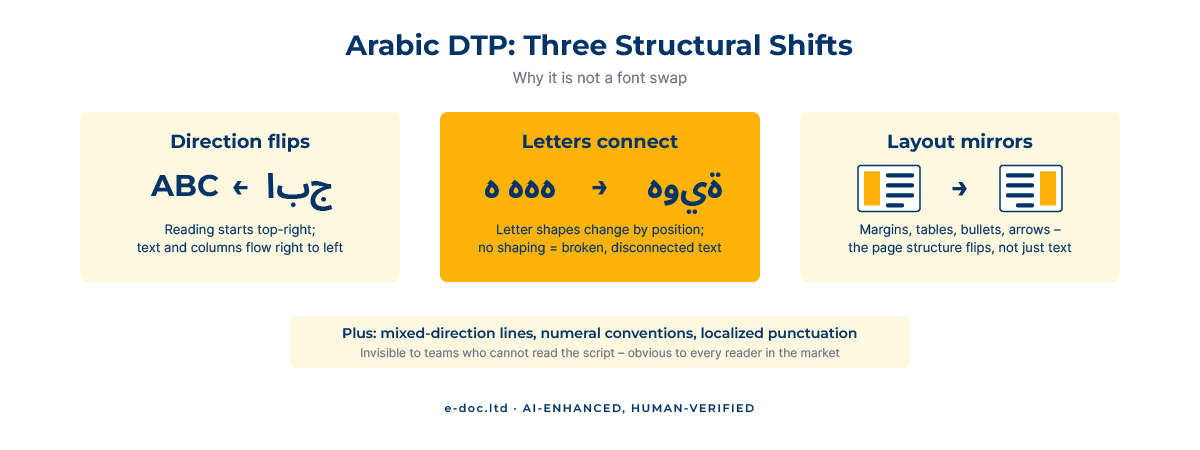
Most multilingual layout work is a re-fitting exercise: the text gets longer or shorter, fonts get substituted, boxes get adjusted. Arabic adds a structural layer on top of all that because it is a right-to-left (RTL), cursive, contextually shaped script. Three consequences follow:
- The page mirrors. Readers scan from the top-right, so columns, margins, indents, image placement, table order, navigation elements, and even the binding side of a printed document flip. A left-aligned English layout translated “in place” reads backward to an Arabic audience.
- The script is connected. Arabic letters join, and most letters take different forms at the start, middle, or end of a word. Software that does not apply proper Arabic shaping renders disconnected, deformed characters – text that is technically present and completely unusable.
- Directions mix on the same line. Real documents embed Latin brand names, email addresses, numbers, and codes inside Arabic sentences. Bidirectional (“bidi”) text handling decides the visual order of these fragments – and getting it wrong silently reverses phone numbers or product codes.
The definitive technical reference here is the W3C’s Arabic Layout Requirements – a useful sanity check on just how much behavior sits underneath “it reads right to left”. If you want the wider context of how layout work fits into translation projects generally, our pillar guide to what multilingual DTP is covers the full workflow.
What Actually Changes in an Arabic Layout
Working through a typical brochure or manual, Arabic DTP touches nearly every design decision:
- Alignment and flow. Body text aligns right; paragraph indents, bullets, and numbering move to the right side; text frames thread right-to-left across columns and pages.
- Mirrored structure. Tables read right-to-left column by column. Diagrams with a reading order (process arrows, timelines) usually need mirroring; photos generally do not, but their captions and placement logic do.
- Typography. Arabic type tends to need a larger optical size than the Latin text it replaces, and the brand font almost never includes Arabic glyphs – a matching Arabic typeface has to be chosen and applied consistently.
- Numerals and dates. A document may use Western digits (0–9), Eastern Arabic digits (٠–٩), or both, depending on the market and the client’s convention – a decision to confirm before typesetting, not after.
- Punctuation. The question mark (؟), comma (،), and percent behavior differ; automated conversions routinely leave Latin punctuation stranded in Arabic sentences.
The Software Side – Why the Standard Tools Are Not Enough by Default
Anyone searching for Arabic DTP software runs into the same fact: standard Western installations of layout tools handle Arabic poorly out of the box. What professional work relies on:
- Adobe InDesign with the World-Ready Composer. InDesign’s Middle East features – enabled in ME editions or activated in standard editions – provide proper Arabic shaping, RTL story direction, RTL table flow, and diacritic positioning. Without the World-Ready Composer engaged, Arabic text visibly breaks.
- Illustrator and Photoshop ME features for graphics and callouts that carry Arabic text.
- Word’s RTL support – genuinely workable for documents that live in Office, provided RTL paragraph direction and complex-script fonts are set deliberately rather than left to defaults.
- Arabic-capable fonts with full glyph coverage – the single most common point of failure when a brand style guide meets its first Arabic project.
The tools are necessary but not sufficient: they make correct Arabic layout possible, not automatic. Every mirroring decision, font pairing, and mixed-direction line still has to be made by a person who knows what to look for.
The Workflow That Keeps Arabic Quality Honest
Professional Arabic DTP runs on a division of responsibility that the translation industry treats as standard practice:
- Input: the original design files plus the approved Arabic translation, supplied as a bilingual source – paired files or a two-column table that maps every source segment to its Arabic counterpart.
- Production: the DTP team rebuilds the layout – mirroring the structure, flowing the Arabic text with correct shaping, pairing fonts, fixing tables and graphics, and applying the numeral and punctuation conventions agreed with the client.
- Layout QA: systematic checks against the source – nothing missing, nothing duplicated, every segment in its mapped position, mixed-direction fragments rendering in the right order.
- Linguistic sign-off: a reader of Arabic on the client side confirms the assembled pages – line breaks, word integrity, and natural text fit – before print or release.
That final step isn’t bureaucracy; it’s honest quality control for a connected script, and serious buyers of Arabic DTP expect it. Production and language sign-off are separate responsibilities – the same split that keeps every multilingual project trustworthy, applied where it matters most.
Do you have documents that need professional Arabic layout?
We rebuild InDesign, Illustrator, Word, and PowerPoint documents for RTL – working from your bilingual source, with mirrored structure, correct shaping, and a sign-off-ready result.
The Failures That Give Naive Arabic Conversions Away
These are the recurring defects in Arabic documents produced without RTL-aware DTP – and the checklist worth running on any Arabic file before it ships:
- Disconnected letters – text pasted through a non-shaping pipeline renders each character in isolated form, the unmistakable sign of a broken workflow.
- Reversed word order – RTL text forced through an LTR engine displays sentences backward.
- Un-mirrored layout – Arabic text sitting in a left-to-right page structure: bullets on the wrong side, tables reading the wrong way, arrows pointing against the flow.
- Scrambled numbers and codes – phone numbers, dates, or product codes visually reversed by mishandled bidirectional text.
- Latin punctuation stranded mid-sentence – question marks and commas that never got localized.
- Tofu and fallback fonts – missing-glyph boxes, or Arabic set in a system fallback that clashes with the design.
Each of these is invisible to a team that cannot read the script – and instantly visible to every reader in the target market. That asymmetry is the entire argument for a disciplined workflow.
Frequently Asked Questions
What is Arabic DTP?
Arabic DTP is the desktop-publishing work of rebuilding a designed document for Arabic: mirroring the layout for right-to-left reading, flowing the text with correct letter shaping, pairing fonts that cover the Arabic script, and fixing tables, graphics, numerals, and punctuation so the result reads naturally.
What software is used for Arabic desktop publishing?
Adobe InDesign with its Middle East features (the World-Ready Composer) is the professional standard for multi-page Arabic layouts, supported by Illustrator and Photoshop ME features for graphics. Word handles Arabic acceptably for Office-native documents when you deliberately configure RTL settings and complex-script fonts.
Does the whole layout really get mirrored?
The structure does: alignment, columns, margins, indents, table order, reading-order graphics, and binding side all flip for right-to-left reading. Photographs usually stay as they are, but their placement and captions follow the mirrored page logic. We confirm mirroring decisions with the client by element type.
Do you translate into Arabic as well?
Our work is the layout stage: we typeset from the approved Arabic translation you provide, supplied alongside the original as a bilingual source. Translation and final linguistic sign-off of the assembled pages sit with your Arabic-reading reviewer – the standard division of responsibility in professional multilingual production.
Why do Arabic letters break apart in some documents?
Arabic is a connected script whose letters change shape by position in the word. Software without proper Arabic shaping renders each letter in its isolated form, producing disconnected, deformed text. It is the clearest symptom of an RTL-unaware pipeline and cannot be fixed by changing the font alone.
Which numerals should an Arabic document use?
It depends on the market and the client’s convention: Western digits (0–9) are common in Gulf business documents, Eastern Arabic digits (٠–٩) in other contexts, and some documents mix both by element type. The convention is agreed before typesetting, then applied consistently throughout.
Arabic DTP is where multilingual layout stops being a re-fitting exercise and becomes structural work: the direction flips, the script connects, the page mirrors, and mixed-direction lines demand real care. The tools make it possible; the workflow – bilingual source in, disciplined production, client-side sign-off out – makes it trustworthy.