You have a notebook, a stack of filled-in forms, or a box of old letters, and you want the words as editable text. Before choosing a tool, it helps to know one thing: software has largely solved printed text, but handwriting is a different problem. Whether you can convert handwriting to text cleanly depends far more on the kind of writing than on the app you pick – neat capitals in form boxes convert well, everyday cursive is still hard for current AI, and some pages need a person to read them. This guide sorts handwriting into four practical levels, shows which tools fit each, and explains how to get the best possible result from whatever you use.
Can You Convert Handwriting to Text Reliably?
Sometimes – and the reason is worth understanding. Printed letters look the same every time they appear: a letter in a given font always has the same shape, so recognition engines can match it with high confidence. Handwriting breaks that assumption. Every writer forms letters differently, the same writer forms them differently when rushed, cursive joins letters into continuous strokes with no clear boundaries, and the spacing between words drifts. A recognition model has to guess where one letter ends and the next begins before it can even guess which letters they are. Modern AI models handle this far better than older software, because they read whole words and lines in context rather than isolated characters. But context only helps when the writing is consistent enough to give it something to work with. So the honest answer to “can I convert handwriting to text?” is: yes for some handwriting, partly for most, and not reliably for the rest. Knowing which group your pages fall into saves hours of frustration.
OCR, ICR and HTR – Three Different Problems
The industry uses three terms, and the differences explain most of what you will see in practice:
- OCR (optical character recognition) reads machine-printed text – books, reports, invoices. It is mature and highly accurate on clean scans.
- ICR (intelligent character recognition) reads hand-printed characters, typically block capitals written one per box on a form. The boxes separate the letters and capitals limit the variety of shapes, so ICR does well on carefully filled forms.
- HTR (handwritten text recognition) tackles free-flowing handwriting, including cursive, by reading whole lines rather than single characters. This is where current AI models compete – and where results vary most.
One more distinction matters: whether the handwriting exists as a photo or scan, or someone wrote it on a screen. Notes written with a stylus on a tablet carry the order and direction of every pen stroke, which makes them far easier to convert than a photo of the same words on paper. If you can choose how people take notes in the first place, digital ink is the easy path. For a broader map of these terms, our guide to what OCR is and how it works covers the whole family.
What Kind of Handwriting Do You Have?
Start by sorting your pages, because the answer decides the tool and the effort:
- Block capitals in form boxes. Applications, surveys, delivery notes, registration forms. This is ICR territory: form-processing tools and the stronger cloud services handle it well, especially when the boxes are clean and the ink is dark.
- Neat hand-printed text. Separate letters, consistent size – meeting notes from a careful writer, labels, index cards. Phone camera tools and cloud services produce usable text, but expect to correct a share of the words, especially names and numbers.
- Everyday cursive. Joined-up writing as most adults actually write. AI handwriting models often get the gist and many of the words, yet the output usually needs heavy correction before anyone can rely on it.
- Messy, faded, or historical handwriting. Rushed notes, hurried shorthand, old letters in archaic hands, faded ink on aged paper. Here software rarely produces anything usable on its own; the practical route is a person who reads the original.
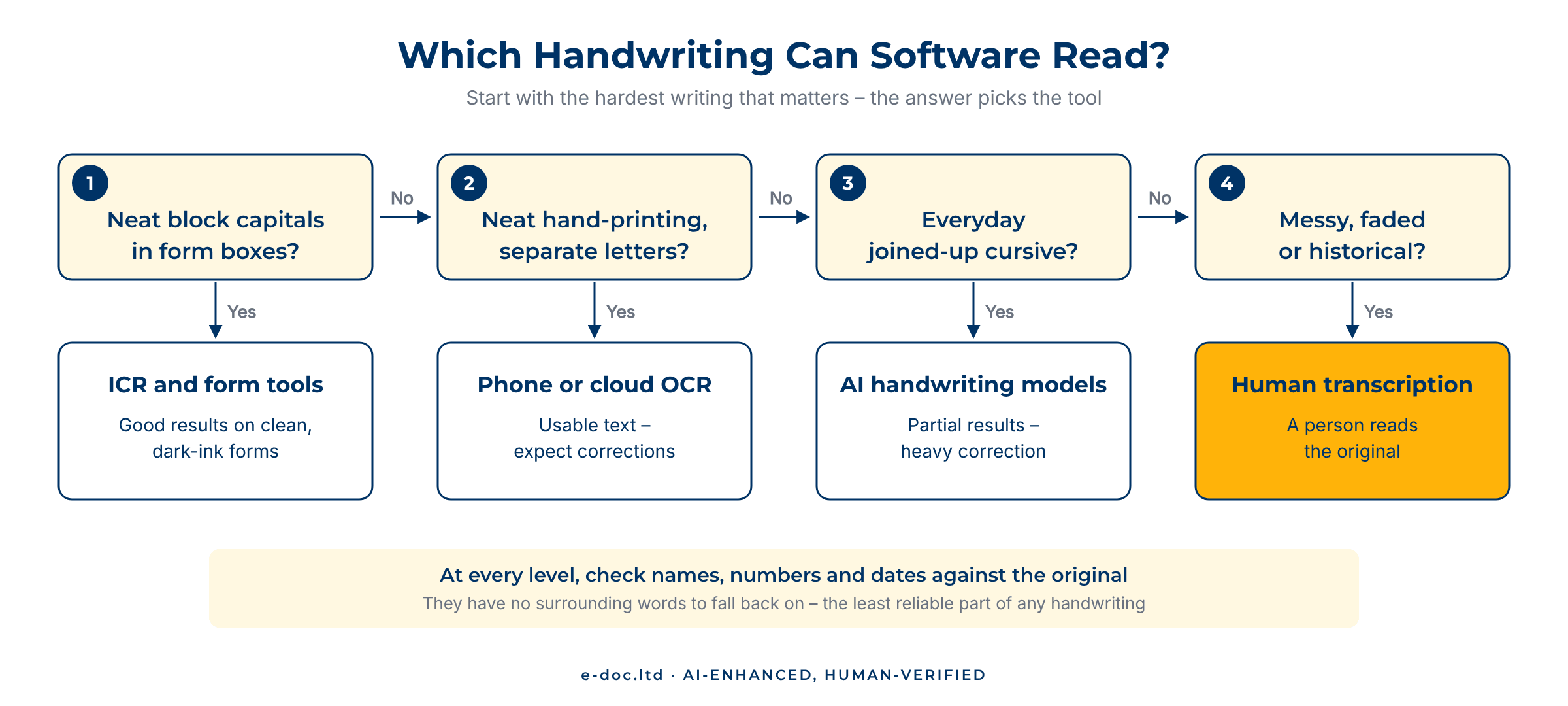
Most real collections mix levels – a form with neatly filled boxes and a cursive comment at the bottom, or a notebook where tidy headings sit above rushed notes. Sort by the hardest content that matters, not by the average page.
The Tools That Actually Work
Phone camera tools
Google Lens and Apple’s Live Text can often pick up neat handwriting straight from the camera or a saved photo, and on clear printing they do surprisingly well. They are free, instant, and good enough for a shopping list or a few lines of notes. They do not suit volume work, long documents, or pages where the layout matters. Our guide to extracting text from an image compares these quick methods in more detail.
Note apps with a stylus
If the writing happens on a tablet, note apps that convert ink to text – the built-in options on iPad, Android tablets, and Windows devices – use the stroke data mentioned above and convert as you write. For new notes, this beats photographing paper by a wide margin. It does nothing for pages that already exist on paper.
Cloud handwriting services
The large cloud providers offer developer services with dedicated handwriting models. Google Cloud Vision’s handwriting detection, for example, runs through its document text feature and can detect the language automatically, while Amazon Textract reads handwriting in English only. These services handle batches and return structured output, but they assume someone writes code around them – and their results still need checking. Our comparison of the best OCR software shows where they fit in the wider tool landscape.
Specialist platforms for archives
Historical handwriting has its own tools. Platforms built for archives and researchers, such as Transkribus, can train recognition models on a specific hand or collection, which helps when one writer filled hundreds of pages. That training takes time and a set of transcribed sample pages, so it pays off on large single-author archives rather than on a handful of mixed letters.
Handwritten pages your tools keep misreading?
Send us a few sample pages. We assess what recognition can realistically deliver for your handwriting, then combine it with manual transcription and checking against the original – for handwritten documents in Latin and Cyrillic scripts.
How to Get Better Results from Any Tool
Recognition quality starts before you open an app. A few habits make a visible difference:
- Photograph or scan flat and sharp. Even light, no shadows, the page filling the frame, and 300 dpi or more for scans. Curled notebook pages and dim photos are where most errors begin.
- Set the language. Handwriting models lean on language knowledge to resolve ambiguous letters; the wrong language setting turns uncertain words into confident nonsense.
- Work in sections. Crop a dense page into blocks, and separate printed headers from handwritten notes so each part goes to the right kind of recognition.
- Check names, numbers, and dates against the original. They have no surrounding words to fall back on, so they are the most error-prone content – the same pattern we describe in why OCR makes mistakes.
- Keep the originals. Converted text is a working copy; the handwritten page stays the reference whenever a word is in doubt.
- Design forms for recognition. If you control the form, use one box per character and ask for block capitals – it moves future submissions from the hard levels to the easy one.
When a Person Is the Right Tool
Software is the right call when the writing is neat, the volume is high, and an occasional wrong word costs little. A person is the right call when:
- The writing is cursive, rushed, or historical. Human readers resolve ambiguous words from context, the writer’s habits, and the subject matter – the kind of judgment current models still lack on difficult hands.
- Every word matters. Legal notes, signed statements, clinical or financial records: a plausible-but-wrong word is worse than a gap.
- The page count is modest but the pages are hard. On difficult handwriting, correcting machine output line by line can take longer than transcribing the page directly.
- The content is confidential. Uploading private handwritten records to free online tools hands them to a third party; a contracted service under NDA keeps control clear.
In practice, the best results often come from a combination: recognition for the parts it reads well, a person for the parts it does not, and a final check of the whole text against the original.
Frequently Asked Questions
Can I convert handwriting to text for free?
Yes, for neat handwriting. Google Lens and Apple’s Live Text read handwriting from a photo at no cost, and tablet note apps convert stylus writing as you write. Free tools work best on short, clearly printed text; for long documents, cursive, or confidential material, expect limits on accuracy, volume, and privacy.
How accurate is handwriting recognition?
It depends on the writing far more than on the tool. Block capitals in form boxes convert well, neat printing produces usable text with some corrections, everyday cursive usually needs heavy correction, and messy or historical writing rarely converts reliably at all. Names, numbers, and dates are the least reliable parts at every level.
Can OCR read cursive handwriting?
Classic OCR cannot – it targets printed text. Newer handwriting models (HTR) can read some cursive, often getting the gist and many words right, but the output typically needs careful correction before you can rely on it.
How do I turn handwritten notes into a Word document?
Photograph or scan the pages flat and sharp, run them through a handwriting-capable tool such as Google Lens or a cloud service, paste the result into Word, and check it against the original page by page. For more than a few pages, or for cursive, a service that combines recognition with manual transcription usually saves time.
Can software read old or historical handwriting?
Only with limits. Faded ink, archaic letter forms, and older spelling defeat general tools. Specialist archive platforms can train models on a single writer’s hand, which helps for large single-author collections; for smaller or mixed sets of old letters, a human transcriber is usually faster and more reliable.
Is it safe to upload handwritten documents to online converters?
For everyday notes, usually. For anything personal or confidential – medical, legal, financial, or family records – check where the tool stores files and who can access them. Some free services keep uploads or reserve the right to use them, so sensitive pages belong with a provider that works under a clear confidentiality agreement.
Whether you can convert handwriting to text cleanly comes down to one question: what kind of handwriting is it? Block capitals and neat printing respond well to today’s tools, cursive gives partial results that need careful correction, and difficult or historical hands still need a human reader. Sort your pages first, pick the tool that fits the hardest content that matters, and always check the result against the original – the handwritten page remains the only source of truth.